
Farmative is your digital hub for everything Fork Farms. It brings five apps — Store, Community, Education Hub, Grow Center, and Support — into a single dashboard at farmative.forkfarms.com.
| App | What It Does |
|---|---|
| Store | Purchase growing supplies, view order history, and track shipping. |
| Community | Connect with fellow growers, share experiences, and learn from the community. |
| Education Hub | K-12 NGSS curriculum, 20-minute activities, and badging programs. |
| Grow Center | Flex Farming 101, Grow Science videos, and growing resources. |
| Support | Troubleshooting, maintenance guides, and questions. |
How to Get Access
Farmative is free for all Fork Farms technology users. When your organization purchases Fork Farms technology and becomes a partner, your primary contact will receive an invitation to Farmative automatically. From there, your admin can invite additional team members.
There are two ways to get into Farmative:
Invitation from Your Admin (Recommended)
This is the best way to get full access. Your organization's Farmative admin can invite you from the User Management tool. You'll receive an email from Farmative (Fork Farms) with the subject line "Welcome to Farmative – You've been invited!" Click the green Accept Invitation button, then follow the login steps below.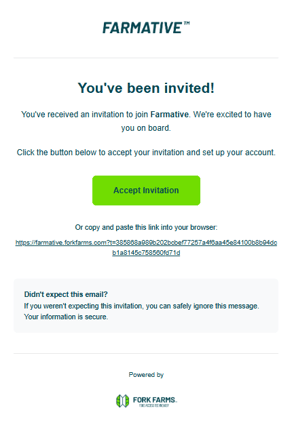
Invited users get access to all apps based on the role their admin assigns.
Self-Signup
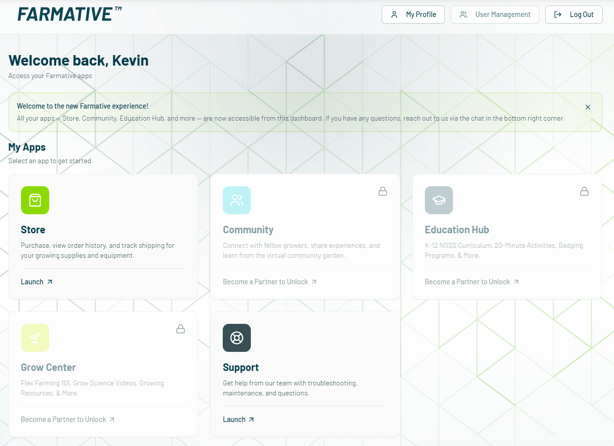
You can also create an account on your own at farmative.forkfarms.com. However, self-signup accounts only get access to the Store and Support. Community, Education Hub, and Grow Center will show "Become a Partner to Unlock" until your account is connected to your organization. To get full access, you'll need your admin to invite you (see below).
Don't Know Who Your Admin Is?
If you have Fork Farms technology but aren't sure who your organization's Farmative admin is, reach out to us and we'll help get you connected:
- Chat — Use the chat widget in the bottom-right corner of the page
- Email — support@forkfarms.com
- Call — (877) 886-7736
Please include the following information:
- Your name
- Your email address
- Your organization name
- Your organization email
- Your title
We'll follow up within one business day with your access details.
How to Log In
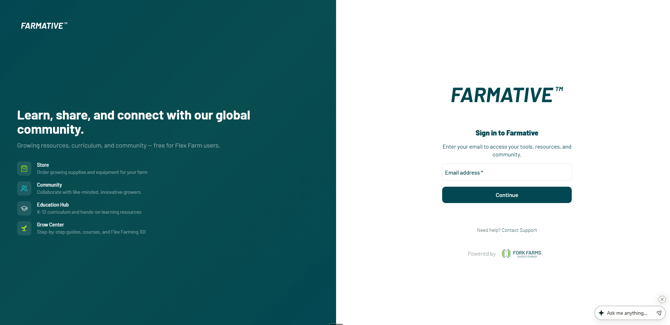
Farmative uses a passwordless login — you'll receive a one-time 6-digit code by email each time you sign in.
- Go to farmative.forkfarms.com and enter your email address.
- Click Continue.
- Check your email for a message titled "Your Verification Code" containing a 6-digit code (expires in 3 minutes).
- Enter the code on the verification screen. You're in.
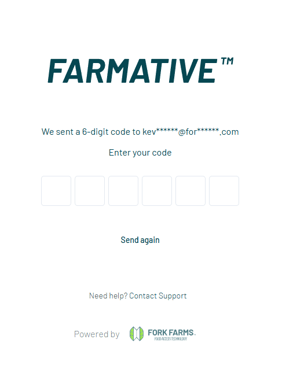
TIP: If the code doesn't arrive, check your spam folder. Click "Send again" to request a new one. For more login help, see How to Log In to Farmative.
First-Time Profile Setup
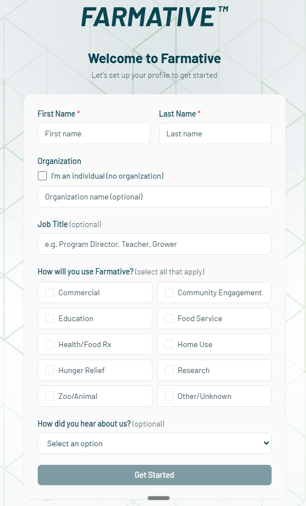
On your first login, you'll see the Welcome to Farmative screen. Fill in your name (required), and optionally your organization, job title, how you'll use Farmative, and how you heard about us. Click Get Started to reach your dashboard.
Your Dashboard
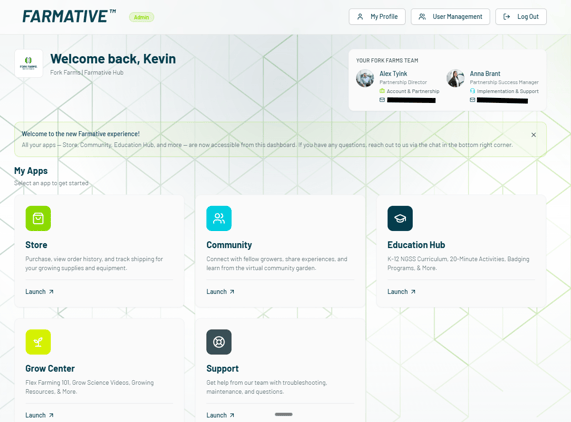
The dashboard shows your app cards, your Fork Farms team contacts, and navigation to your profile. Admin users will also see a User Management button in the top-right for inviting and managing team members.
App Card Labels
- "Launch ↗" — The app is ready. Click to open.
- "Become a Partner to Unlock ↗" — Available to Fork Farms partners only. If you already have Fork Farms technology, your account may just need to be connected to your organization — see "I Have Fork Farms Technology but Can't Access All Apps" below. If you're not yet a partner, visit forkfarms.com/start-now.
- "Talk to your admin for access" — Your organization has this app, but your role doesn't include it. Ask your admin to update your role.
Your Fork Farms Team
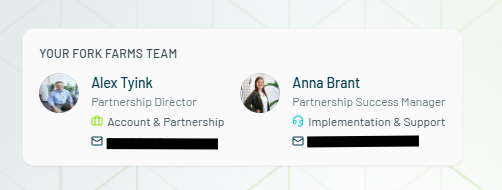
Partner accounts see a YOUR FORK FARMS TEAM card on the dashboard with your assigned Partnership Director and Partnership Success Manager. Click the email icon next to either contact to reach out directly.
I Have Fork Farms Technology but Can't Access All Apps
If your dashboard shows locked apps or doesn't display your organization name and team card, your account likely isn't connected to your organization yet. This is common if you signed up on your own rather than through an admin invitation.
To get full access:
- Ask your admin to send you an invitation from the User Management tool. Once you accept, your account will be linked to your organization with the appropriate access.
- Not sure who your admin is? Contact Fork Farms Support with your name, email, organization name, organization email, and title. We'll follow up within one business day.
- Chat widget in the bottom-right corner of the page
- Email: support@forkfarms.com
- Call: (877) 886-7736
Need Help?
| Resource | How to Access |
|---|---|
| Chat | Chat widget in the bottom-right corner of the page. |
| Email Support | support@forkfarms.com |
| Call Support | (877) 886-7736 |
| Knowledge Base | forkfarms.com/knowledge |
| Your Fork Farms Team | Check the team card on your dashboard. |